10. Process Models and Scheduling
Real Time Operating Systems (RTOS) •
Process Information
Process Image
- Refers to the snapshot of a process’ state at a specific point in time
- Contains all necessary information for the process to execute:
- User memory: stack, heap, code segment,
.bss - Process Control Block (PCB): data needed to control the process
- Assuming VM provides separation and swapping
- User memory: stack, heap, code segment,
- Must be (at least partially) loaded in main memory to execute
- i.e., Process image is essential for OS to control and manage process effectively
Process Control Block (PCB)
- Contains essential information about a process, including:
- Registers (program counter, status word, etc.)
- FPU state
- Descriptor tables (e.g., IDT — Interrupt Descriptor Table)
- Memory pointers to code and data, shared memory blocks
- Fault handler
- Flags
- Process Identification: PID, parent, descendants, user
- Processor state: PCB: registers, status word
- Process information:
- Process information (state, priority, event)
- Signals and Timers
- Credentials
- File descriptors
- System call vector
- Serves as a data structure that holds all necessary details for the OS to manage and control the process effectively
Process Creation
 {width=200px}
- Building the PCB to store process information
- Allocate memory for the process to execute
- Create an execution context (thread) for the process
- Run the process
Process Switch
- Saves context of currently running process into PCB
- Updates process with new state and accounting information
- Moves process to appropriate queue (ready, blocked, etc.)
- Selects another process to continue its execution
- Updates MMU (Memory Management Unit)
- Restores PCB of selected process to continue execution
- i.e., allows OS to efficiently manage multiple processes by switching between them to utilise system resources effectively
Process Termination
 {width=200px}
Occurs when a process exits due to reasons such as:
- Calling
exit(2)function - Receiving a
SIGKILLsignal - Encountering an unhandled signal
- Exceeding resource limits
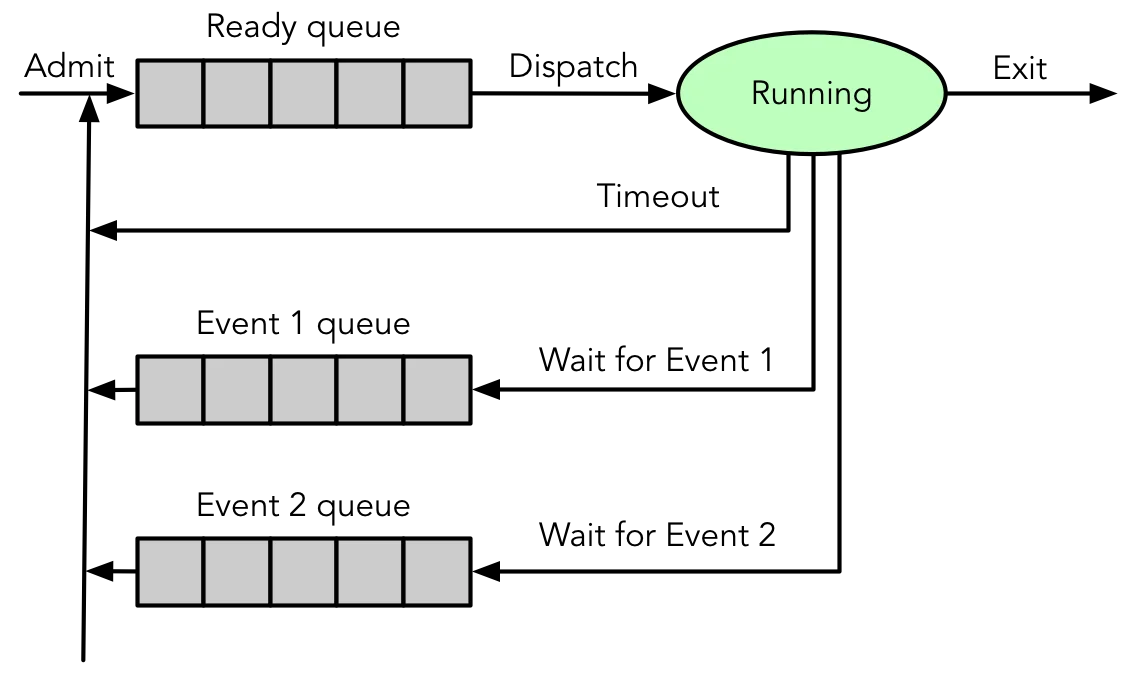
Queueing Model
 {width=400px}
Analysis and optimisation of processes waiting to be executed
Process models
- Progresses from simple to realistic process execution models.
Two-state model:
- Simplest process model; divides process execution into two states:
- Running
- Exit
- In this model, a process is either actively running, or has been terminated.
 {width=500px}
 {width=500px}
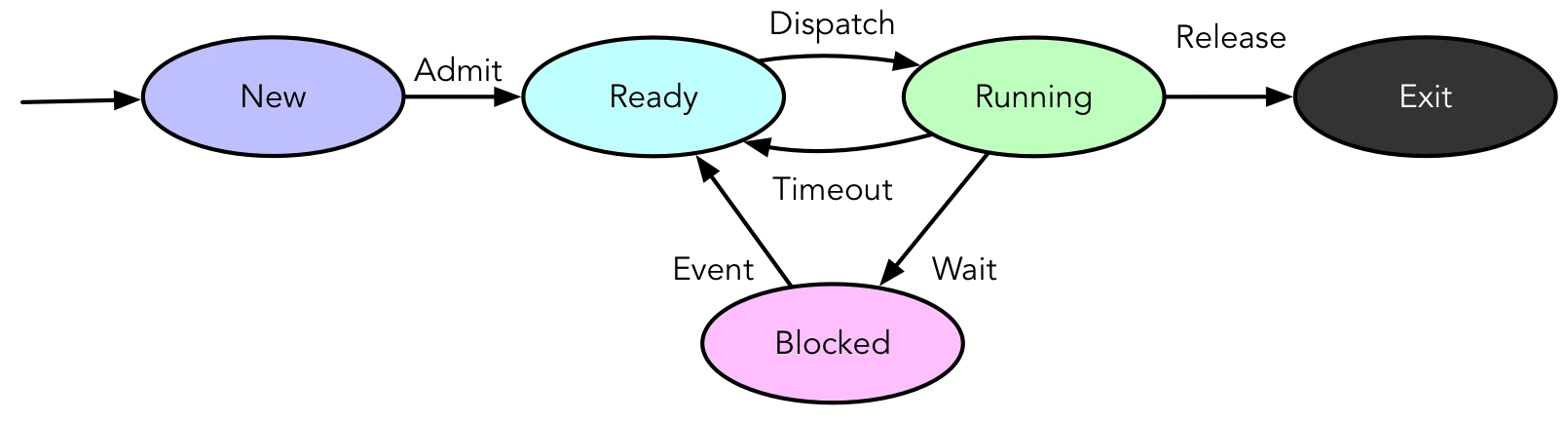
Five-state model:
 {width=600px}
- New: Created but not ready to execute
- Ready: Can execute when scheduled by the OS
- Running Actively executing
- Blocked: Waiting for an event (e.g., I/O completion)
- Exit: Terminated but metadata remains in memory
Process State Transitions
- Defines the movement of a process from one state to another:
- Null New: Process creation
- New Ready: OS prepared to make process runnable
- Ready Running: Dispatch ready process to execute
- Ready Exit: Terminated by other process (e.g., parent)
- Running Exit: Termination
- Running Ready:
- Process has had its time continuously running
- Higher priority process has become ready — preemption
- Voluntary yield (e.g.,
sleep(3),nanosleep(2))
- Running Blocked: Process waits for syscall, I/O, etc.
- Blocked Ready: Event that process is waiting for occurs
- Blocked Exit: As above
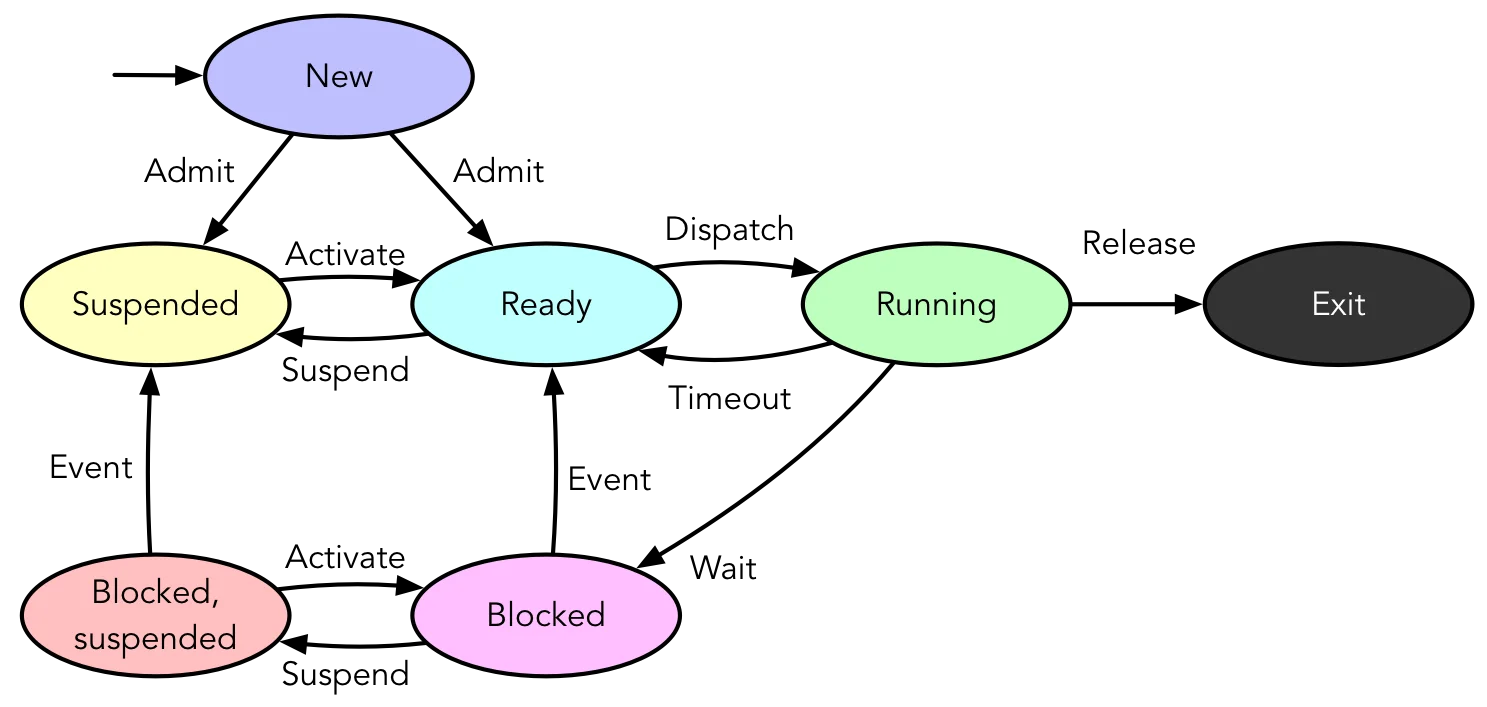
Seven-state model:
 {width=600px}
- A more detailed representation of process behaviour, including specific conditions and events for transitions between states
- Introduces additional process state transitions:
- Ready Suspend: Manual suspension (
SIGSTOPorSIGTSTP) - Suspend Ready: No ready process or suspended process has highest priority
- Blocked Blocked/Suspend: Manual suspension (
SIGSTOPorSIGTSTP) - Blocked/Suspend Suspend: Event being waited for occurs
- New Ready/Suspend: Depends on available resources
- Blocked/Suspend Blocked: Higher priority than any in Ready queue; resources available
- Running Ready/Suspend: Pre-empted by Suspended process and memory ended
- Any Exit: Termination
- Ready Suspend: Manual suspension (
Reasons for suspension:
Lists various reasons for process suspension.
| Reason | Comment |
|---|---|
| Swapping | OS needs to release resources for another process |
| User Request | e.g., debugging or manual suspension (Ctrl+Z) |
| Timing | Suspension of periodic process while awaiting next run |
| Parent Request | Debugging, examination, coordination of descendants |