23. Real-Time Scheduling
Real Time Operating Systems (RTOS) •
Real-time Operating Systems (RTOS)
- Focus on determinism over speed for consistent performance
- Operations performed at fixed, pre-determined times or within intervals
- Usually in response to external events
- Includes max. delay from interrupt action to action (e.g., 5 ms)
- Responsiveness for timely event handling
- Time to service an event
- Involves time taken to start running the Interrupt Service Routine (ISR)
- Time for the ISR to perform useful actions
- Interrupt Nesting:
- Allows faster urgent ISR execution
- But can also introduce delays if the running ISR is interrupted
- Time to service an event
- Stability to consistently service the most tasks, even if all tasks cannot be completed
- Emphasis on “doing things consistently”
- Ensure critical tasks are handled reliably
RTOS Features
- Real- time Operating Systems are characterised by…
- small size
- quick response to external interrupts
- preemptive scheduling based on priority
- Includes key dispatcher that adds priority and deadlindes to standard metrics like fairness and responsiveness
Recall: FCFS
- If First-Come-First-Serve scheduling is implemented without prioritisation, wait time for tasks with deadlines could be unbounded
- Poses risk of missing deadlines
- Can lead to excessive wait time
- Unsuitable for time-sensitive applications
Adding Priority
- Allows tasks to “skip the queue” and run next after the current task is completed
- But, high-priority task still needs to wait until currently running task is ready to yield
Adding Preemption
- Priority-driven preemptive shceduling
- Wait time depends on time to next preemption point
- OK iff quantum size small vs required response times
- Transforms FCFS into Round-Robin
- Tasks are interrupted based on priorities
- Ensures real-time tasks can run after no more than the scheduling quantum
- Good approach if scheduling quantum is smaller than the required response time
- e.g., tasks need 0.5s and we’re using 100ms scheduling quantum
- Allows deadlines to be met
Priority-drive Immediate Preemptive Scheduling
- Interrupt current task as soon as higher priority task needs to run
- Doesn’t want for the end of scheduling quantum
- Ensures higher-priority tasks are executed promptly
- Prioritises tasks based on importance and urgency
- Allows critical operations to be handled without unecessary delays
Another Scheduling Dimension
- Involves preemption and priority as crucial mechanisms
- Policy can vary based on type of OS
- Conventional OS: Dynamically at run-time
- Traditional Monitor: (Possibly) statically
- RTOS: Can do either
Static RT Scheduling
- Static priority-driven preemptive:
- Statically analyse tasks to determine set of priorities rather than fixed schedule
- Ensures tasks run in correct order based on priorities
- No need for dynamic adjustments at runtime
- Assume tasks with processing time and period
- Processor utilisation ()
- In general,
- Periodic scheduling is feasible if utilisation of all tasks is less than 100$ of total CPU time
- Rate Monotonic Scheduling (RMS):
- Period based priority: shorter period higher priority
- Guarantees feasible schedule as long as utilisation is less than a specific threshold ()
- … use remainder of 100% of utilisation for best-effort tasks
- Period based priority: shorter period higher priority
Dynamic RT Scheduling
- Dynamic Planning-based
- Determines feasibility of tasks at runtime
- Tasks only accepted if feasible to meet time constraits
- Aims to dynamically adjust schedule based on real-time conditions
- Dynamic Best Effort
- No feasibility analysis
- Try to meet all deadlines
- But may abort a task or process if deadline is missed
- Aims to maximise task completion while maintaining flexibility in handling missed deadlines
Aperiodic Scheduling
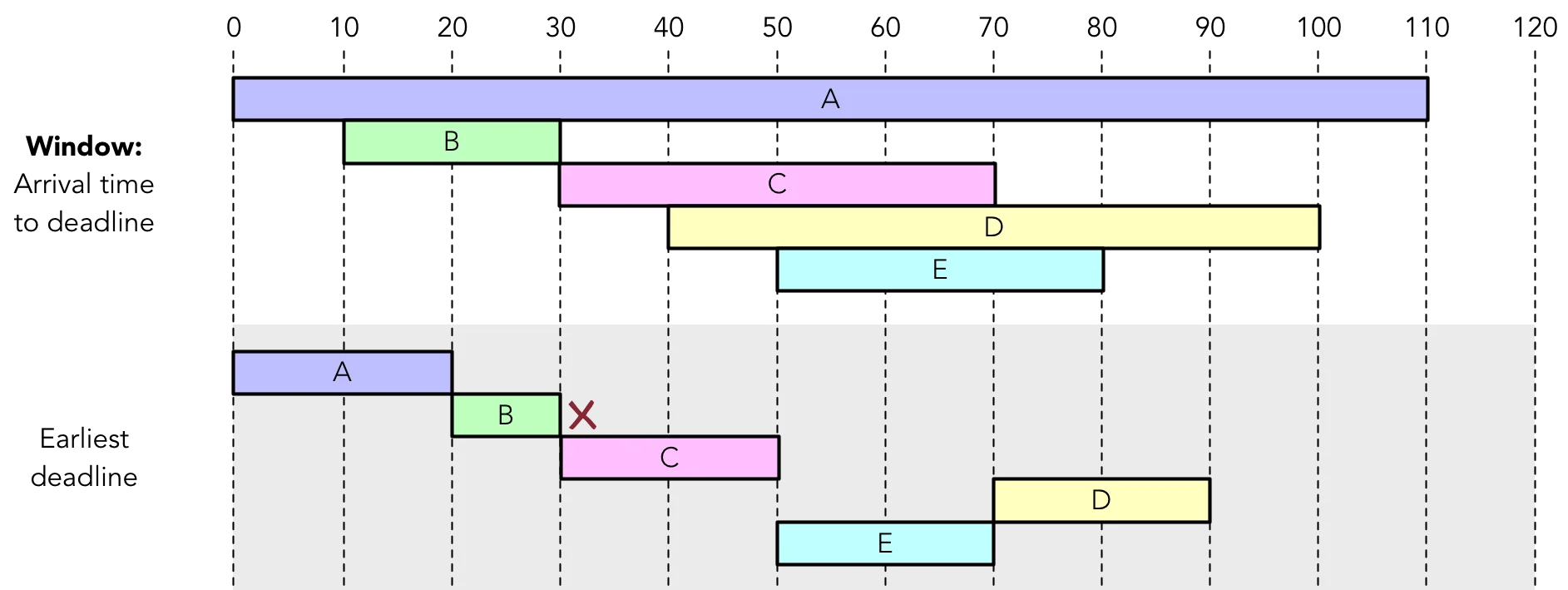
Tasks arrive aperiodically and having starting deadlines
- Earliest Deadline Met:
- Tasks schedules based on earliest deadline
- No preemption required
- But tasks may miss deadlines if higher-priority task arrives after they have started
- Earliest deadline next with idle times:
- Like Earliest Deadline Met, prioritises tasks based on deadlines rather than complete times
- But also allows for idle times between tasks
