21. I/O History
Real Time Operating Systems (RTOS) •
Evolution of I/O
- Direct Processor Control:
- CPU issues I/O instructions
- *Memory-*or port-mapped
- Programmed I/O:
while STATUS == BUSY:    # wait until device is not busy
    pass
write data to DATA register
write command to COMMAND register
# device starts executing a command
while STATUS == BUSY:    # wait until device is done with your request
    pass
Interrupt-drive I/O
- CPU sends a command to the device and continues with other tasks
- Device rasises an interrupt when done
- Interrupt handlers manage the completion
- Considered better than Programmed I/O
- unless some I/O is always ready
- Limitations: CPU still has to do the work of copying data
- Performance Improvement Approaches:
- Channel processors:
- Acts as separate coprocessors with a reduced instruction set
- CPU send I/O programs to the channel for execution
- Still a prevalent I/O model in modern mainframe computing
- Direct Memory Access (DMA):
- Simpler solution by copying data directly to memory without CPU intervention
- CPU instructs device to read or write and provides physical address
- Reduces bus contention as only DMA and CPU are involved in data transfer (Efficiency)
- Channel processors:
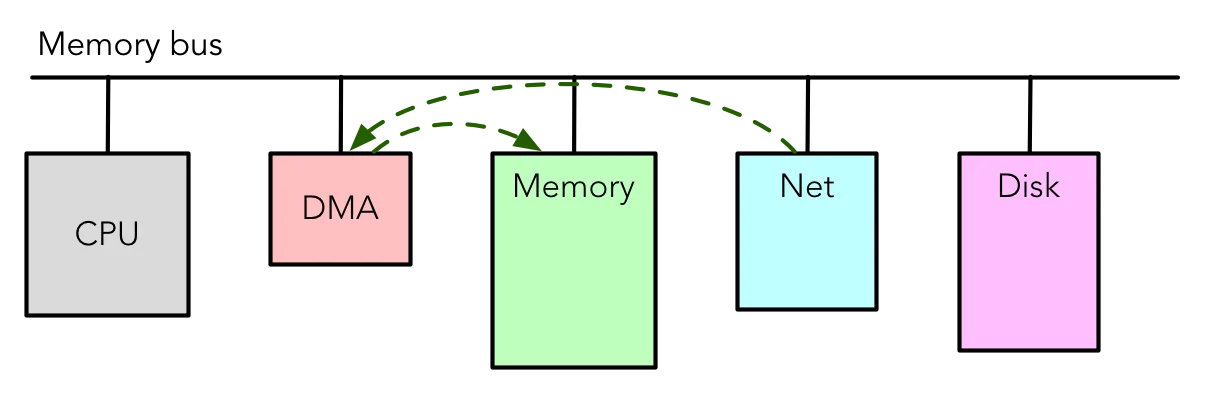
Discrete bus-connected DMA
 {width=400px}
- Acts as an independent coprocesseor
- like the Intel 8237 in IBM XT
- Connected to the bus separately, providing direct memory access capabilities
Integrated DMA
- DMA engined is integrated into I/O devices, reducing bus contention
- Enables direct memory access without involving the CPU in data transfer
IBM PC XT
- Original Chipset:
- Features discrete memory, timer, I/O chips, etc.
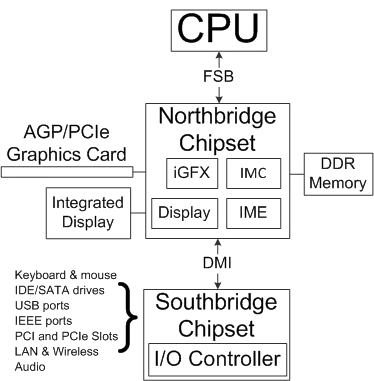
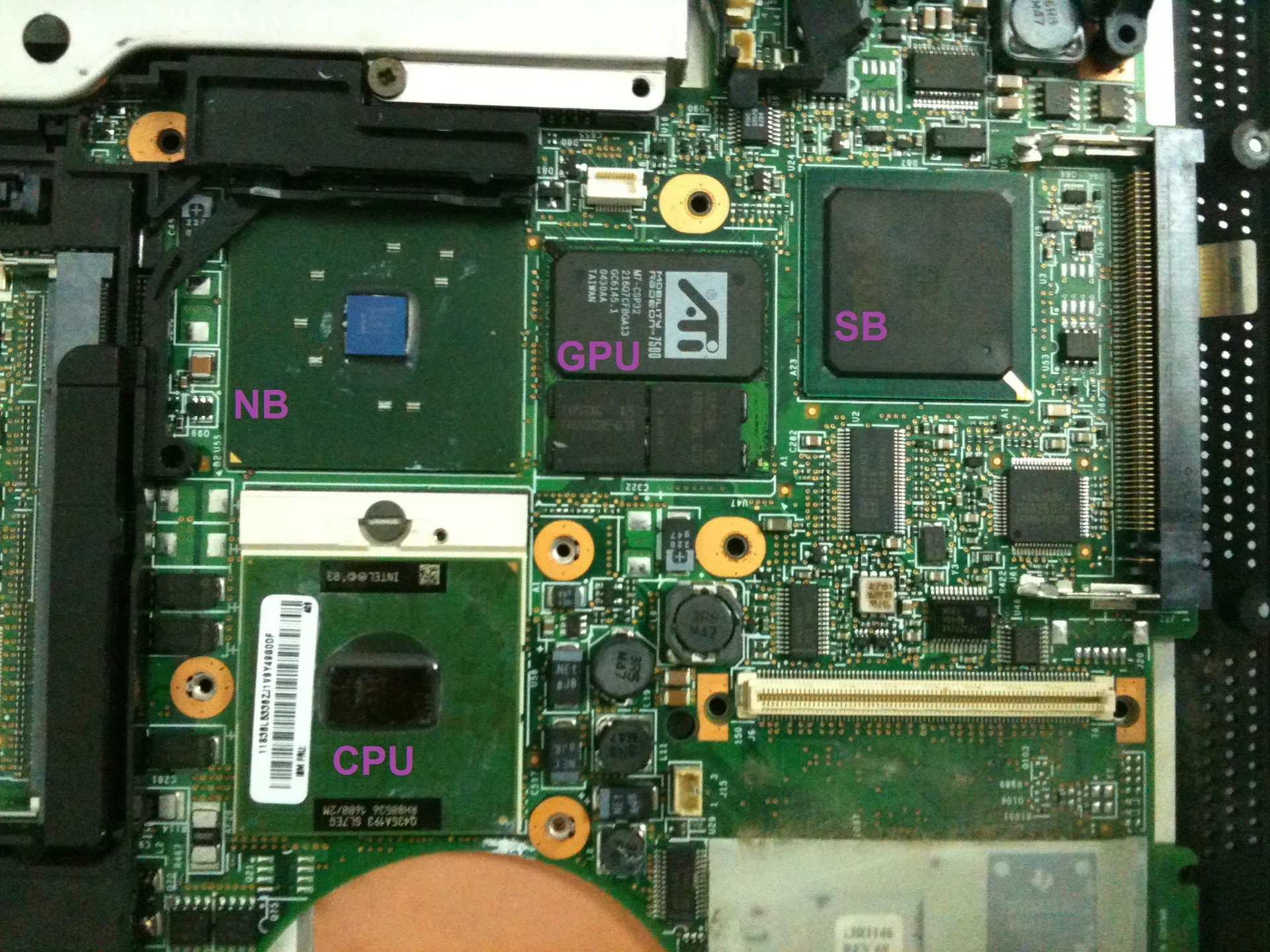
Northbridge/Southbridge
 {width=250px}
 {width=350px}
- CPU talks to Northbridge via front-side bus
- For fast I/O operations like memory and graphics
- Southbridge manages slower I/O operations
- The Situation:
- Processors by Intel and AMD
- Chipsets made (or bought) by Acer, ASRock, ASUS, etc.
- The Problem
- CPU Performance hindered by Northbridge
- LSI advancements led to changes in scale, heading towards the Integrated Memory Controller
Integrated Memory Controller (IMC)
- Integrated into CPUs like AMD Athlon 64 (2003) and Intel Core (2008) to handle memory operations
- Eliminates the need for the Northbridge to manage memory, improving efficiency
- Subsequence Integration of Graphics further streamlined I/O process
- This lead to the development of On-die Graphics and Memory
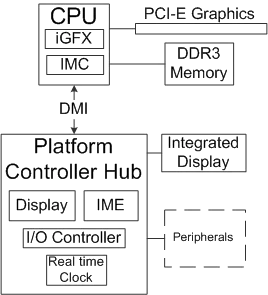
On-die Graphics and Memory
 {width=250px}
- CPUs now include on-die memory and graphics components for faster processing
- Remaining resources are directed to Intel Platform Controller Hub or AMD Fusion Controller Hub
Hardware Configuration
How do we connect and configure hardware?
- Historical Process: Earlier configurations involved manual jumper settings and software configurations to avoid conflicts
- The Bus: Allows device to communicate by sharing common backplane with physical connections
- Extensible: Easy to add new hardware without rewiring
- Flexible: Physical arrangement is not important
- The Bus: Allows device to communicate by sharing common backplane with physical connections
- Modern Approach: Today’s hardware configuration utilizes PCI configuration space and ACPI for power management
- Automation Process: Advancements have reduced manual settings, with software pushing configurations to hardware, albeit with some plug-and-play challenges
Historical Process: ISA Bus
- Initially “IBM-compatible” or “XT”, later evolved into “Industry Standard Architecture”
- XT:
- 8 data pins
- 20 address pins
- Address Enable
- IO/memory read/write
- IRQs
- DMAs
- Ground/Vcc
- Clock
- various other features for I/O operations
- AT (Evolution):
- More data and address bits
- More IRQs
- etc.
ISA Backplane
- Simplicity: Electrically straightforward design with exposed memory and port regions to the CPU
- Supported by various vendors
- Can connect devices and share data with the CPU
Hardware Configuration (Pre-PCi)
- Largely a manual process with jumpers and solder traces
- done to prevent Interrupt Requests (IRQ) and DMA conflicts
- Requires sofitware configurations to ensure proper device communication and avoid resource conflicts
- Later, progressed to plug-and-play systems, reducing the need for jumpers and manual configs
PCI: Peripheral Component Interconnect
- Introduced PCI Configuration Space
- Allows kernel to query device config information
- Allows devices to request PCI memory regions, IRQs., etc, with registers
Modern Approach: PCI Express (PCIe)
- Features point-to-point multi-gigabit lanes and data striping
- Improves data transfer
- Utilizes packetised transport for efficient communication between devices
Modern Hardware Configuration
- PCI configuration space
- ACPI (Advanced Configuration and Power Interface):
- Utilised for advanced configuration and power management
- Inlcludes processor power states, device control, basic devices, etc.
- Utilised for advanced configuration and power management
Configuring Non-x86 Hardware
- Finding Hardware: Locate hardware by compiling addresses into kernel/bootloader or loading a compiled device tree representation
History of Buses:
- x86: ISA, PCI, AGP, PCIE, USB, FireWire, etc.
Device Drivers
- Three Main Parts
- Configurations
- I/O servicing (top)
- I/O servicing (bottom)
- All parts are very event driven.