11. Scheduling
Real Time Operating Systems (RTOS) •
Scheduling
Deciding which task to assign to a resource at a given time, such as…
- Handling I/O requests
- Transitioning process states
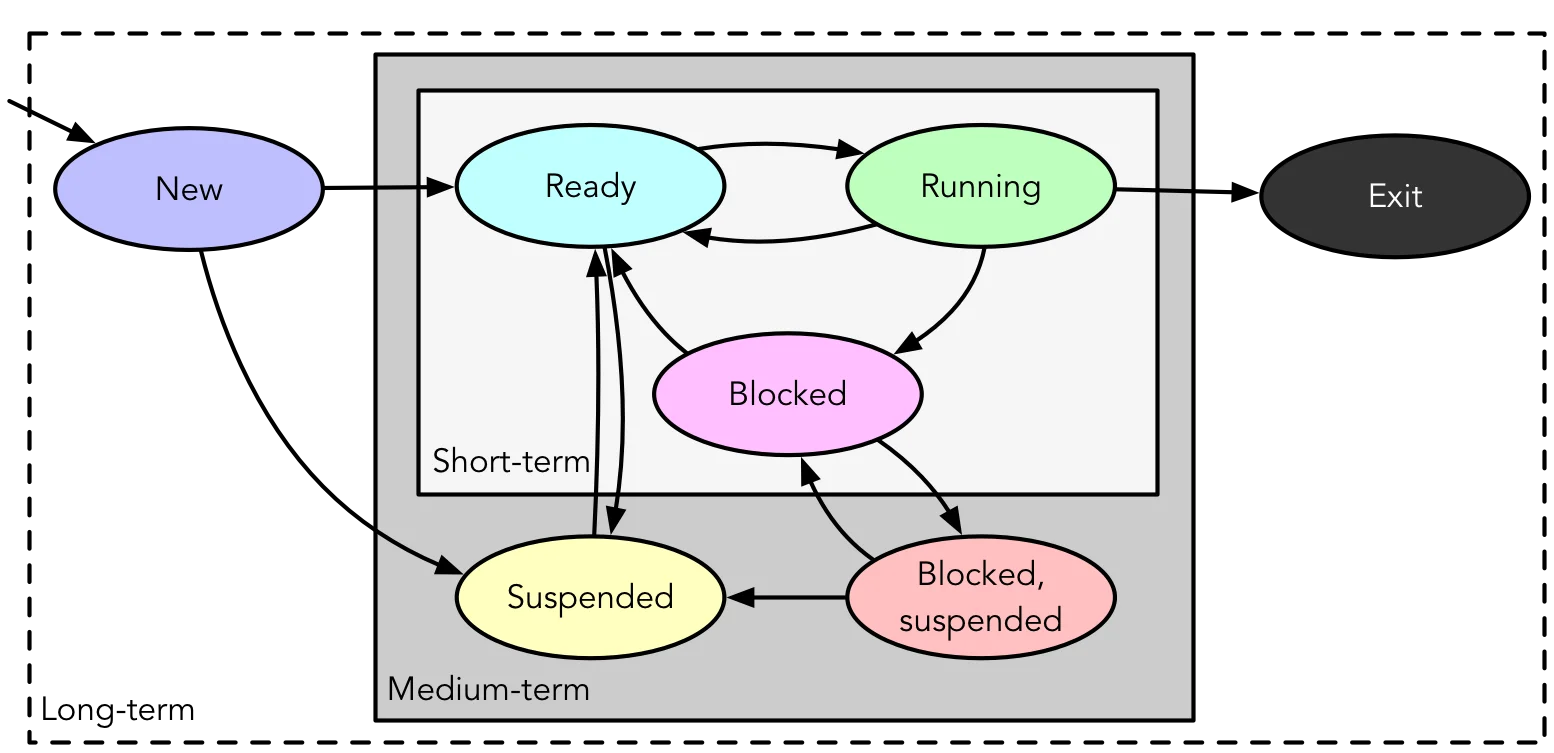
- Selecting processes for execution based on various criteria:
- Long-term: New Ready, * Exit
- Medium-term: Suspend, Unsuspend
- Short-term: Ready Running
 {width=600px}
Long-term Scheduling
- Involves admitting processes to the ready queue
- Batch: Jobs added to batch queue; scheduler decides…
- When OS can accept new processes
- Which job to prioritise first
- Time-sharing: Grant until saturation:
fork(2)bomb
- Batch: Jobs added to batch queue; scheduler decides…
- Transitions processes from New to Ready state for execution.
Short-term Scheduling
- Also known as Dispatcher
- Chooses a Ready process to execute
- Triggers when current process blocks, on an interrupt (I/O or timer), or on a syscall.
- Transitions processes from Ready to Running state to ensure efficient CPU utilisation
Criteria
Divided into two categories, focusing on different aspects of performance and efficiency in scheduling:
System Oriented:
- Performance:
- Throughput: Processes/work completed per unit time
- Utilisation: Percentage of time that processor is busy
- Other:
- Fairness: Treated the same, absence of starvation
- Priorities: Higher priority first
- Balancing resources: Busy but not overstressed
User Oriented:
- Performance:
- Turnaround Time: Submissions to completion
- Response time: Request to start of response
- Deadlines: Maximize percentage of deadlines met
- Predictability: Runs in same time regardless of load
Scheduling Policies
- Rules and strategies used to determine which task or process to assign to system resources at any given time
- Scheduling strategies and algorithms applicable to uniprocessor systems without strict real-time constraints:
- Selection function: What gets to go next
- time spent in system so far, waiting
- time spent in execution so far
- (estimated) total time required by process
- Decision mode: When selection function is executed
- Preemptive: OS may preempt running process
- Non-preempting: No such pre-emption
- Selection function: What gets to go next
Scheduling Metrics
- Service time: Represents total execution time,
- Turnaround/residence time (TAT): Represents total waiting time,
- Normalised turnaround time: Indicates service quality
- minimum = 1; larger values indicate poorer service.
Synchronization Granularities
The different levels at which synchronization can occur in a system
- Independent parallelism: No explicit synchronization time sharing
- Coarse-grained: Involves concurrent processes and message passing in a distributed system
- Medium-grained: Includes multitasking within an application thread scheduling
- Fine-grained: Involves parallelism in single instruction stream instruction reordering (i.e., with instruction reordering)
Design Issues
Design issues in scheduling involve…
- assignment of process to processors
- use of multiprogramming on individual processors
- dispatching
Process Assignment
Assignment of processes can be done in different ways depending on the scheduling method. For example…
- Static: Processes permanently assigned to processors (dedicated queue for each professor)
- Pros:
- Low scheduling overhead
- Allows group/gang scheduling
- Cons
- A processor may be idle while others have backlog
- Pros:
- Dynamic: Processes scheduled on any available processor
- Pros:
- Less change of idleness and backlog
- Cons
- Higher scheduling overhead
- Dynamic Load Balancing: Multiple queues, but processes moved between queues to balance load.
- Pros:
Where is it done?
- Leader/Follower: Decisions are mode on one processor
- Pros:
- Simple
- Conflict resolution straightforward
- Cons
- Leader can bottleneck
- Pros:
- Peer: Scheduling can happen on any processor
- Pros:
- Eliminates bottleneck processor
- Cons
- Complicates OS
- Must ensure processors don’t choose same process
- Conflicts for resources need to be managed
- Pros: