5. Memory Allocation
Real Time Operating Systems (RTOS) •
Memory Allocation: Allocating portions of computer’s memory to progress or processes for them to use.
Types of Memory
- Stack: Allocations/deallocations managed implicitly by the compiler
- Also called automatic memory
- Data or information that you want to live beyond the call invocation should not be left on the stack.
- Example: Allocating an integer on stack
void func() {
	int x;	// declares an integer on the stack
	...
}- Heap: Allocations/deallocations handled explicitly by programmer.
- Provides more challenges to both users and systems.
- Example: Allocating an integer on heap
void func() {
	int *x = (int *) malloc(sizeof(int));
	...
}
Observing the code above, we can point out the following
- Both stack and heap allocation occurs:
int *x: Compiler makes room for a pointer to an integer.malloc(): Program requests space for an integer on the heap.
- The routine retunrs the address of integer (on success,
NULLon failure), which is then stored on the stack.
Applications
- Dynamic Allocation:
- Arbitrary sizes
- Arbitrary lifetimes
- Allocators
- Manage the heap
- Must be fast
- Must reclaim memory
Memory Allocation API
malloc(3), calloc(3), realloc(3), etc.
- Allocate bytes of heap memory.
- Aligned in a way that is can allocate any data type.
- Result:
void* malloc()call:- Pass it a size asking for room on the heap.
- Success—returns pointer to newly-allocated space.
- Failure—returns
NULL.
free(3)
- Releases memory for general use again.
- i.e., frees allocation created via
malloc(), calloc(), etc. - No size: must be stored by allocator
Memory Management
- Garbage collector: Mechanism to automatically manage memory used by programs, cleaning and reclaim memory no longer needed by the program.
- Helps deal with memory leaks or manual memory management.
- Buffer overflow: Not allocating enough memory.
- Uninitialized read: Can happen when you call
malloc()properly but forget to fill in values into the data type.- i.e., reads data of unknown value from heap.
- Memory leak: Essentially forgetting to free memory.
- Segmentation fault: Usually refers a program attempting to access a memory location it can’t access or forgetting to allocate memory.
- Dangling pointer: When a program frees memory before it’s finished using it.
Free-Space Management
- Free List:
- List of ranges of physical memory currently not in use.
- Data structure used to track unallocated memory.
- Not necessarily a list.
- Fragmentation: When memory is divided into smaller chunks that it becomes difficult to allocate large blocks of memory, even when there is enough free memory.
- Internal: Within blocks
- Allocated memory blocks larger than actual amount of memory needed by process (excess space).
- Excess remains unused and can’t be allocated by other processes (inefficient memory utilization).
- External: Between blocks
- Free space gets cut to small pieces.
- Think of it as physical memory becomes full of little chunks of free space, that it becomes difficult to allocate new segments or grow existing ones.
- Internal: Within blocks
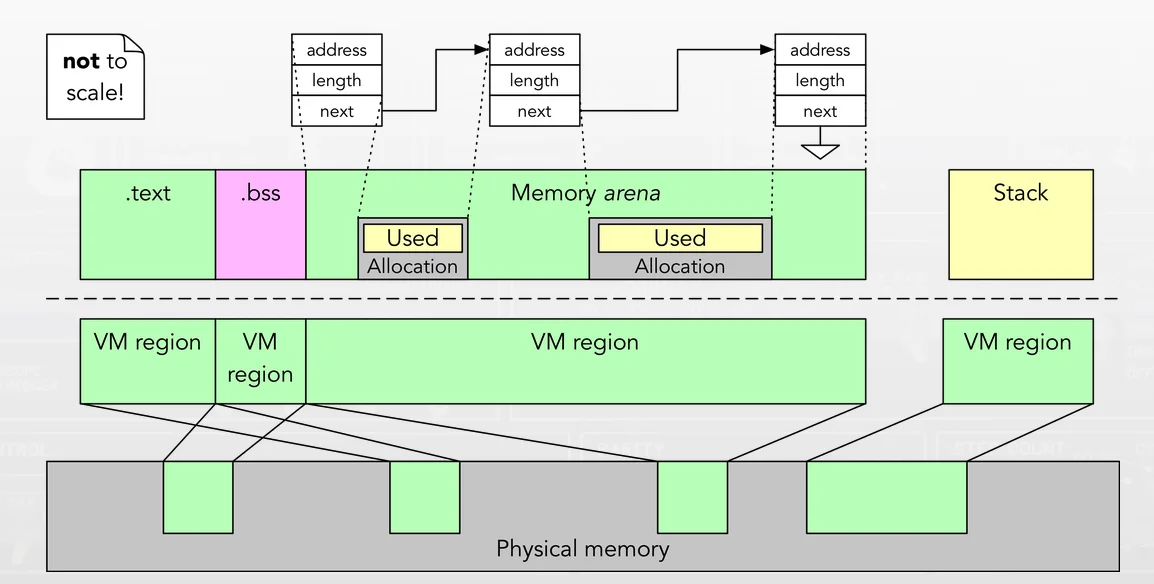
Where does memory come from?
- Userspace answer: From the kernel
- Kernel answer: Self-management of phsical memory
| Buckets | points into… |
| Zones | that take from… |
| Kegs | composed from… |
| Slabs | located in… |
| Arenas | which makes up… |
| Submaps | in a virtual address space… |
Allocation Strategies
- Best fit: Search through free list and find chunks of free memory as big or bigger than the requested size.
- Return smallest chunk out of the possible candidates.
- Requires full walk of free list, but one pass is enough.
- Worst fit: Opposite of best fit. Find largest chunks.
- Keeps large free block contiguous.
- Also requires full walk of free list.
- Terrible performance and could result in excess fragmentation while still having high overheads.
- First fit: Finds first block big enough and returns requested amount ot user.
- Allows early search termination (i.e., very fast).
- But pollutes the beginning of free list with small objects.
- Next fit: Continuation of first fit, where instead of starting from the beginning, algorithm starts search from where we left off.
- Keeps an extra pointer to the location last referenced.
- Similar performance to first fit.
Allocation Size
How much memory is needed to store bytes?
- bytes + per-allocation header + possible free list entry
- … and maybe round up?
- Exact: External fragmentation
- Constant: Internal fragmentation
- Balance: Power of two
Buddy Allocation
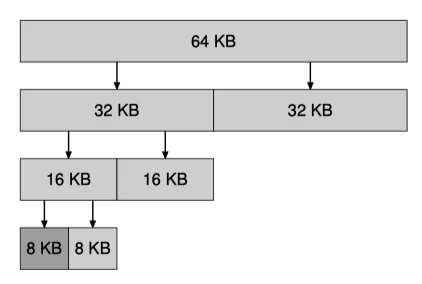
- Divides memory into fixed-size blocks:
- Divides free space by two until a block big enough to accommodate request is found.
- Each block is referred to as a “buddy”class.
- Allocates memory in powers of two:
- Free memory is seen as a big space of size (e.g., 4KB, 8KB, 16KB).
- Example: Process requests 10KB, allocator allocates 16KB, the smallest available size.
- Implements splitting and coalescing:
- When larger block allocated, it’s split into smaller blocks if necessary.
- Conversely, when a lock is deallocated, allocator checks if its busy (adjacent block of same size) is also free. If so, buddies coalesced into larger block.
- MATH & LOGIC:
- if , allocate entire block.
- else, split block into equal buddies until
- coalesce buddies of size when they become free
Slab Allocation
- Array of constant-size objects, bitmask of allocations
- Initialize on first allocation
- Freed objects returned to pool for later reuse
- Not helpful for general (arbitrary-size) allocations